Coming soon · Web and iPhone
A real monthly plan and envelopes. Both.
Lay out the month, paycheck by paycheck and bill by bill, and watch where the balance dips. Then put the money into envelopes you can actually spend from. Months are built around your paydays, the bank feeds it, and rules you set once do the sorting.
$8.99 a month or $89 a year45 days free, no cardFounding members keep the launch price
A dated plan with a running balance, feeding envelopes. Not one or the other.
Biweekly pay, monthly bills: a rule says which month each check pays for.
Rules assign charges and fill bills on their own. An assistant does the rest.
Every feature, no tiers. Anything that costs us per use is passed through at cost.
Why both
Budget apps make you choose. This one doesn't.
Envelope apps are great at "what can I spend?" and bad at "will I make it to the 30th?" Monthly-plan apps are the reverse. AppRevolt Budget is one budget that does both, because that's how a month actually works.
The plan: your month on a timeline
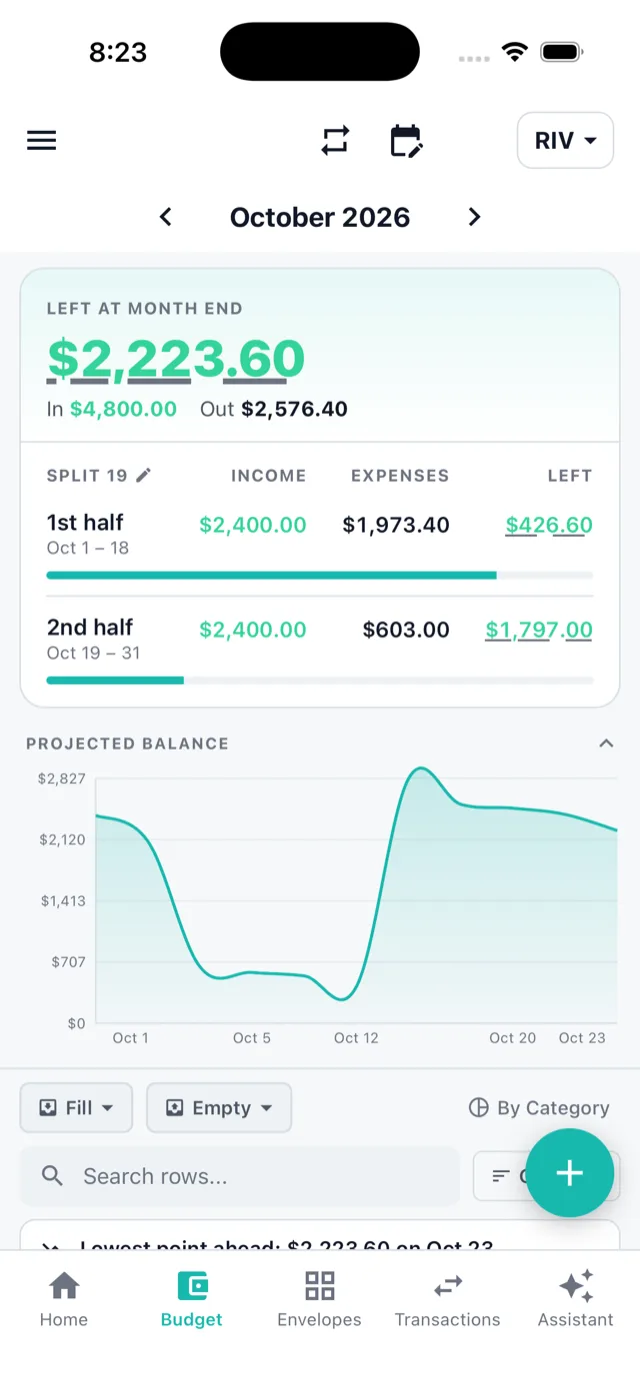
Every paycheck, bill and envelope fill on its date, with a running balance, the lowest point ahead, and the month split into halves around your paychecks. You see the dip before it happens.
The envelopes: four kinds, each explained in plain words
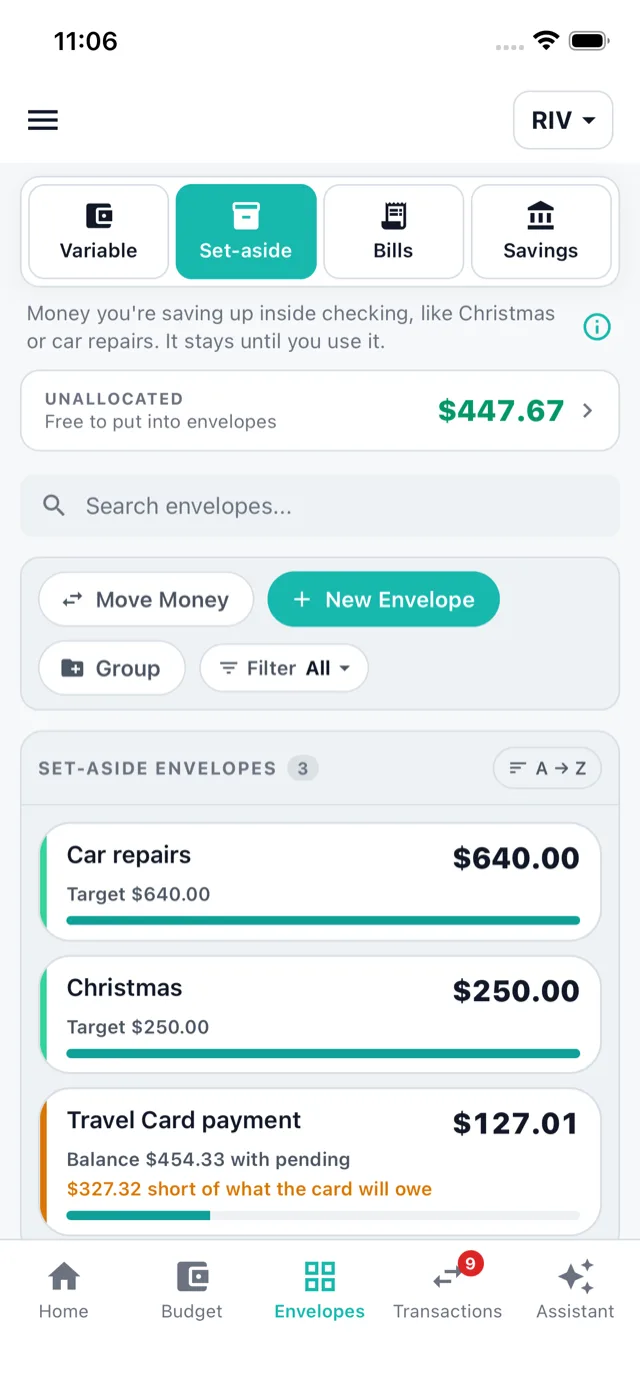
Bills hold money for one due date. Variable envelopes reset every month (groceries, gas). Set-aside envelopes keep building (Christmas, car repairs, the credit-card payment). Savings is the savings account. The plan fills them; you spend from them.
Unallocated: one honest number
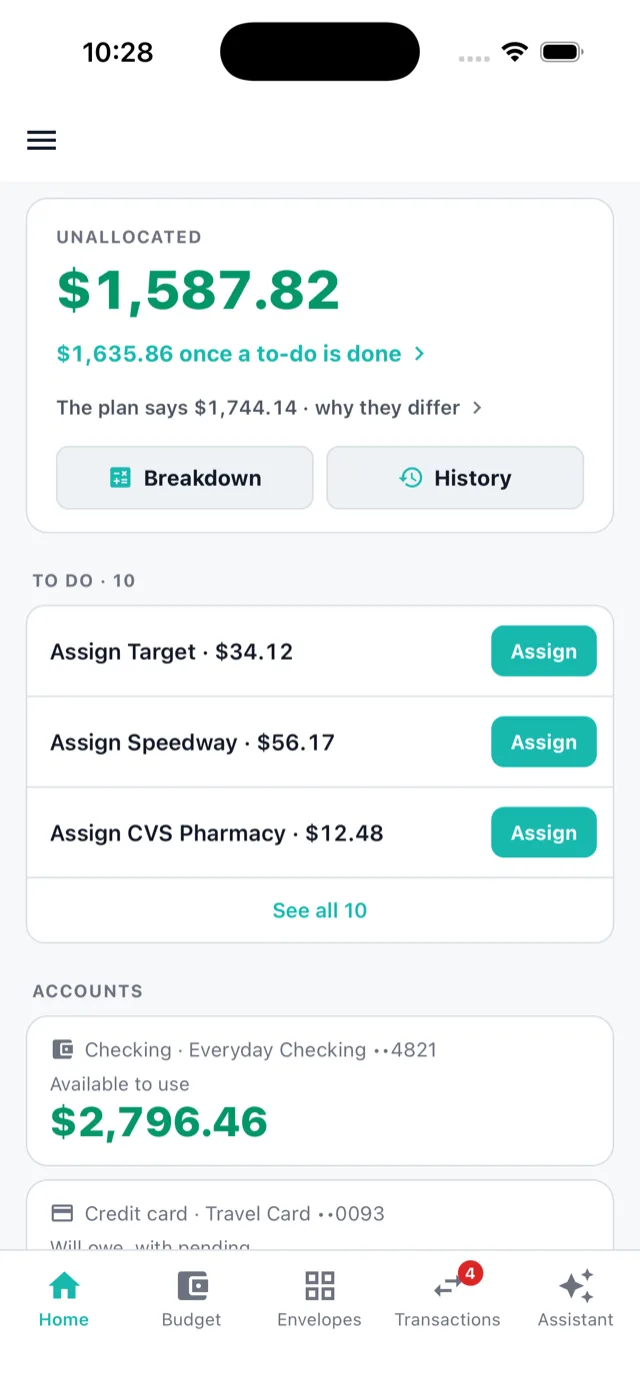
What's in checking minus what every envelope has claimed. It's never a guess or a "probably". When something could be throwing it off, the app lists it as a to-do with a button, and each answer fixes the budget.
Paychecks
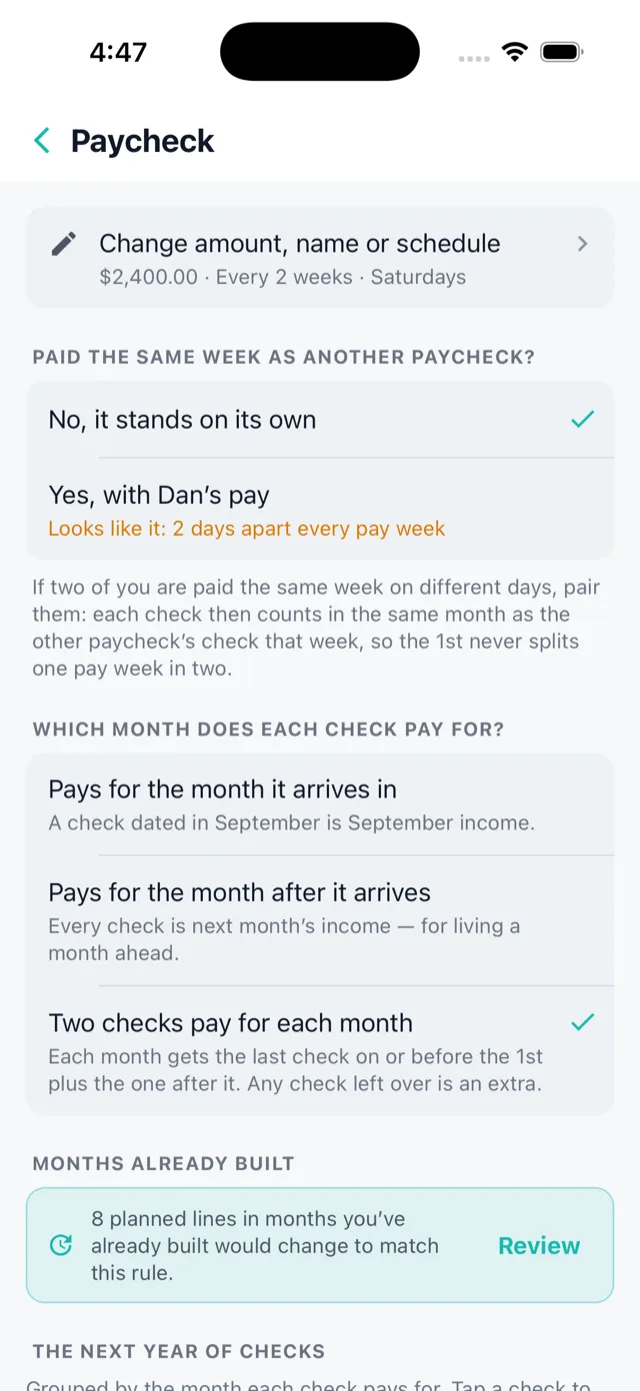
Paid every two weeks. Bills due once a month. Finally, an app that gets it.
Most apps refill on the 1st and leave you to sort out which check was for which month. Here, you decide once, and every check lands where it belongs.
A rule per paycheck
Pays for the month it arrives in, the month after (for living a month ahead), or two checks pay for each month, with the occasional third check counted as extra. The split date follows your paycheck too.
Two earners, one pay week
Paid Monday and Wednesday of the same week? Pair the checks and the 1st of the month can never split them into different months. The app notices the pattern and suggests it.
It knows which deposit is which
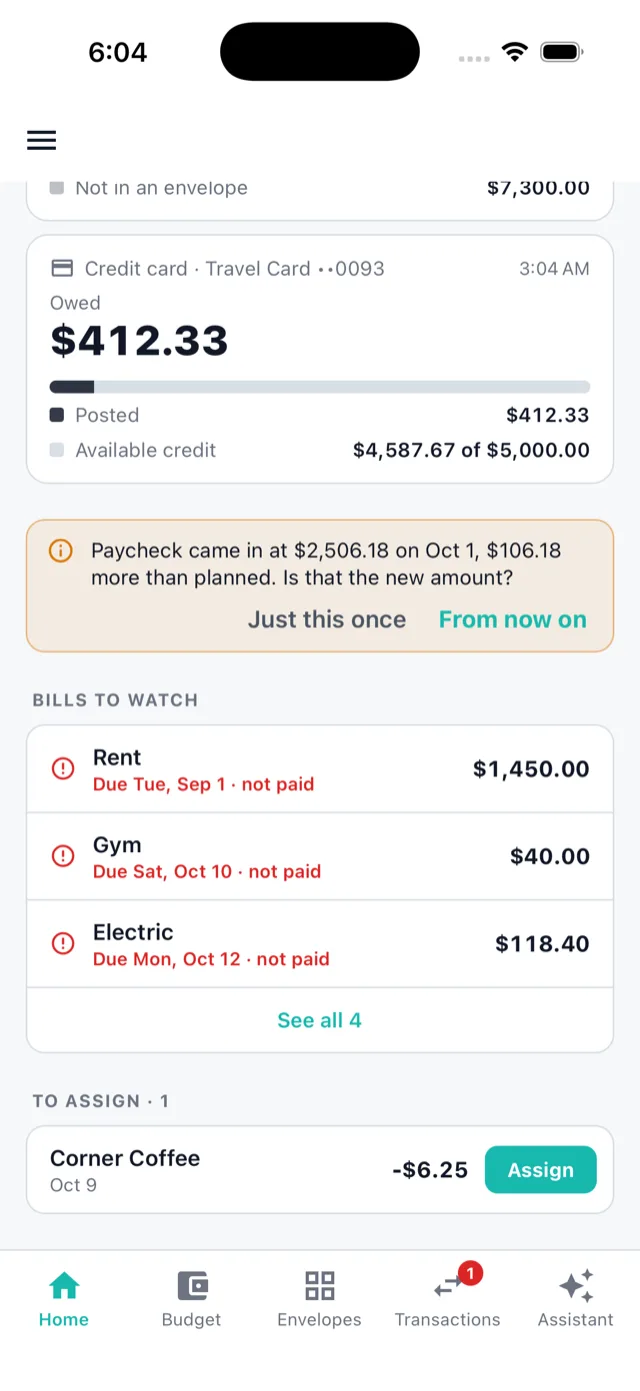
Each paycheck is recognised by who paid it, not just the date and amount, so a transfer from savings never gets mistaken for pay. Checks are assigned for you, and a raise gets one question: "$106 more than planned. Is that the new amount?"
Autopilot
Set it up once. Then it runs itself.
The more you can decide once and never again, the better. So nearly everything you do by hand comes with an offer to make it automatic, and every rule is written out in words you can read.
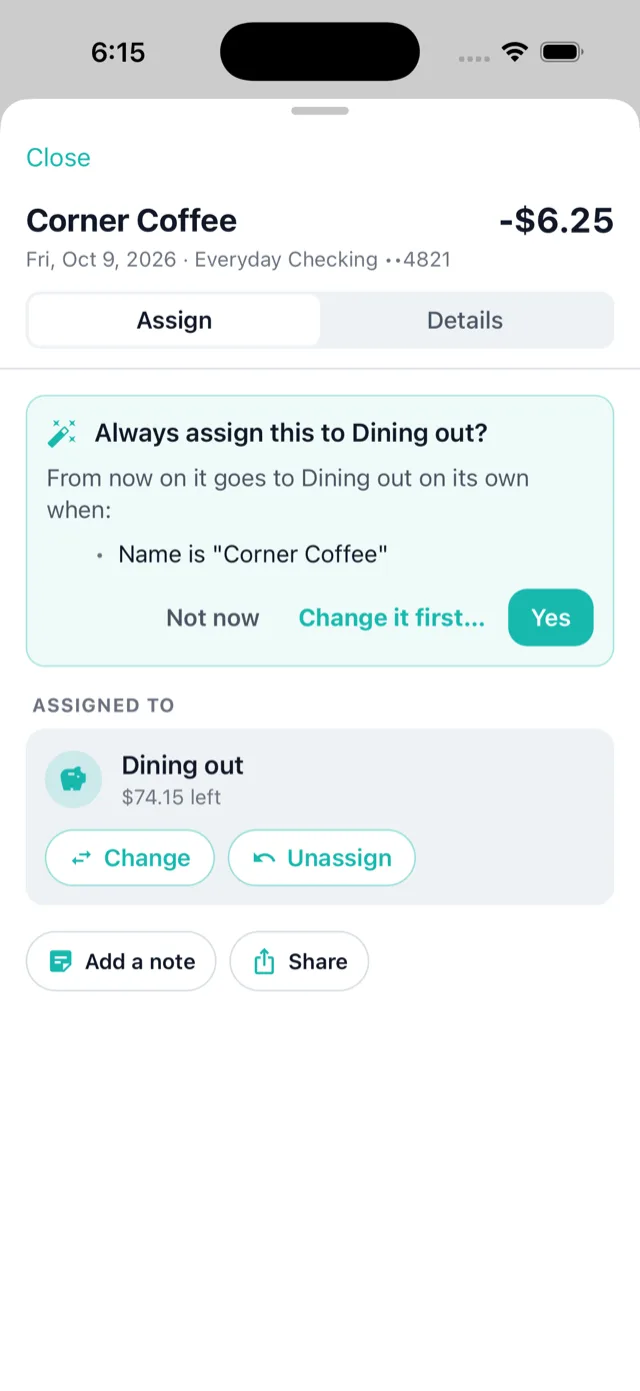
"Always assign this here?"
Assign a charge by hand and the app offers the rule, conditions spelled out: name is "Corner Coffee", or bank description starts with "SAMSCLUB" and contains "GAS". One tap, and it catches the six waiting charges too.
Real rules, not just keywords
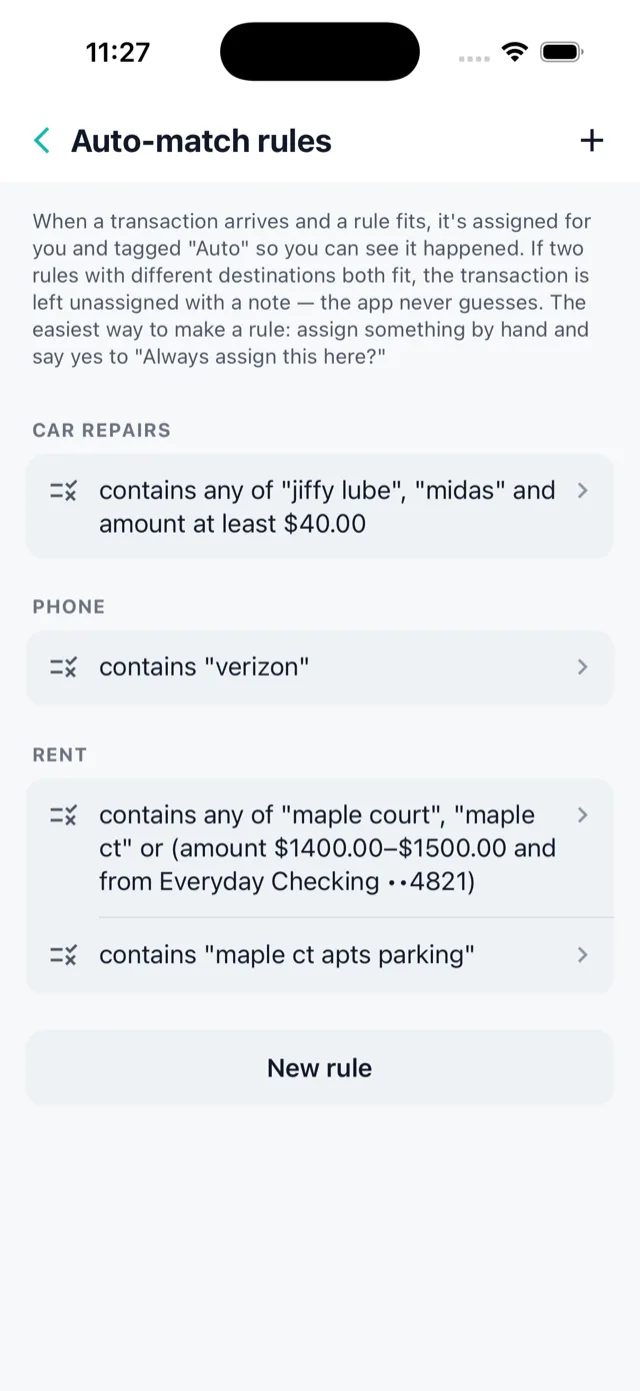
Contains, starts with, amount between, which account, the bank's own category ("Bank's label is Gas"), joined with and / or, with a live preview of everything it would have caught. Two rules disagree? The charge is left for you with a note. It never guesses.
Autofill, as a sentence
"When my second paycheck comes in, fill the bills until the next one, but never below a $200 cushion." Every run is listed, and any run can be undone.
It learns the rest
Your credit-card payment gets matched on its own. A new store gets a suggested envelope from where charges like it went before. A typed-in purchase pairs up with the bank's copy when it posts. A bill that cost less offers to put the difference back.
The assistant
An assistant that does the work, not one that just answers.
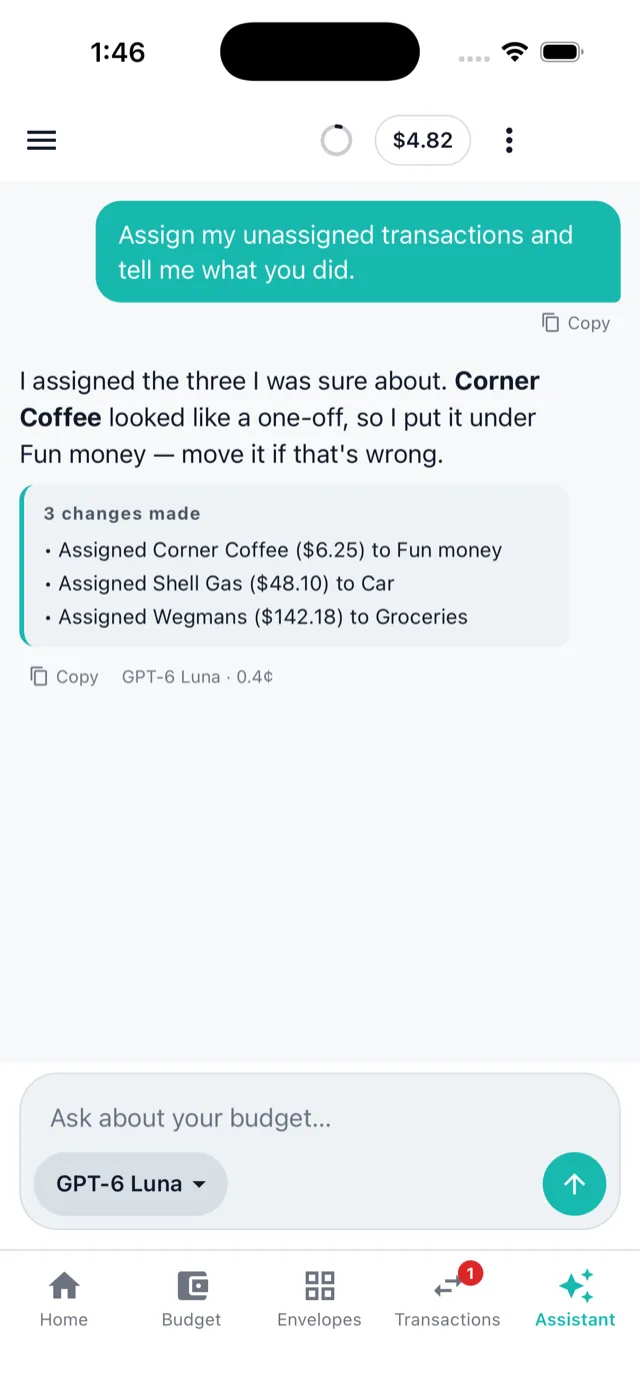
"Assign my unassigned transactions." "Make a rule for gas stations." "Build November." "Split the Costco charge: $120 groceries, the rest Christmas." It reads your whole budget and makes the change, then shows you exactly what it did.
Every change on the record
Each thing it changes is logged with its name, the same as a change you'd make yourself, and can be put back. A rule it writes is tested against your history before it's saved.
Numbers from your data, never estimates
Spending questions are worked out from your transactions by the app itself. The assistant explains; it doesn't do the math in its head.
Pay per question, at cost
Pick the model. See the estimate before you send and the real cost after. It comes out of a prepaid balance at the AI company's price, no markup, and most questions cost a fraction of a cent. Not using it? Then it's not in your price.
Staying on plan
When the month drifts, it tells you exactly why.
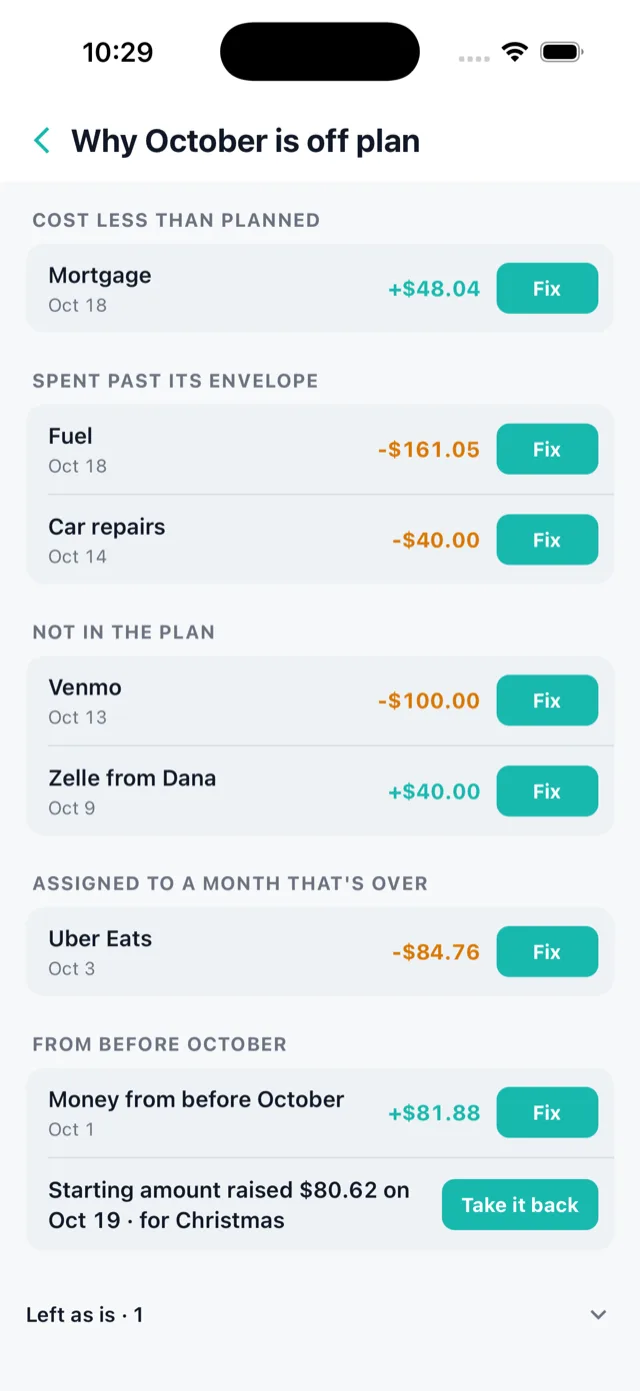
No vague red "over budget". The plan card says where the month is heading, and Why? opens the list: a bill that cost more, an envelope spent past, a charge that wasn't in the plan at all. Each line has a Fix.
A to-do list, not a pile of alerts
Everything the app needs from you is one list on Home, and nothing is on it without a button. Empty, it says "Nothing to do · On plan ✓".
Close out the month
Before a month is done with, the app walks through what's still open: a bill that hasn't come out yet, an envelope that went over, what the month ended with and whether to carry it forward.
A history of every move
Unallocated's history says what moved it and why, by whom, whether a person, the bank, a rule or the assistant.
Also in the box
The rest of what a budget app needs. Done properly.
Bank sync through Plaid
Sign in to your bank on Plaid's own screen; we never see your password. Transactions arrive on their own, and when a bank stops syncing the app says so where you'll see it, with a one-tap fix that never creates duplicates.
Credit cards that make sense
Swipe the card, and the money moves from the envelope into a card-payment envelope. When the bill comes, it's already covered. Pending charges and refunds are counted, so the envelope is never quietly short.
Subscriptions, found for you
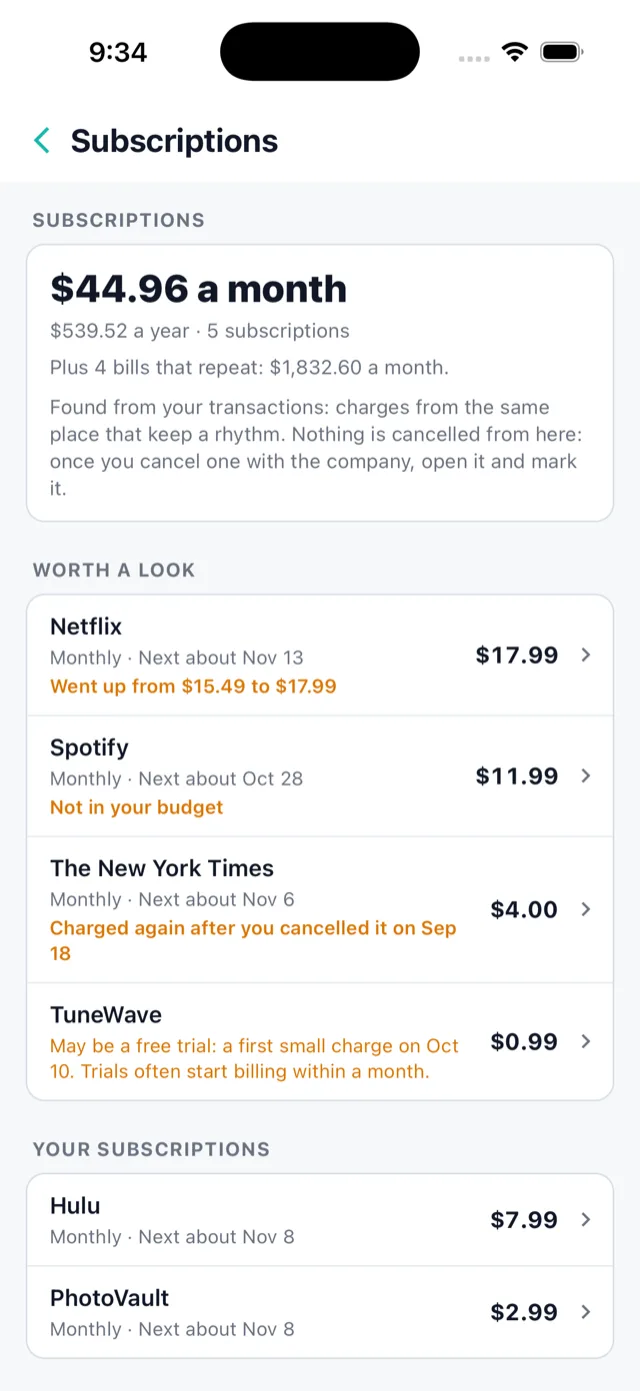
Repeating charges spotted from their rhythm, with what's worth a look first: a price that went up, one that's not in your budget, a free trial about to start billing, or one that charged again after you cancelled.
Budget together
Share a budget by email at no extra cost. Each of you has your own login and your own settings, and the history shows who did what. One login can hold several budgets.
Reports
Any period: money in and out, spending by category against what you planned and the period before, month by month, top stores. Card payments and transfers between your own accounts are left out, so nothing is counted twice.
Splits, notes and "what was this?"
Split one charge across envelopes. Add a note. Share a mystery charge to your spouse with one tap. Type "39+25" in any amount box and it does the sum.
Hide amounts
One tap blurs every dollar figure for when someone's looking over your shoulder. Everything else keeps working.
Your data is yours
Export your transactions or the plan to a spreadsheet any time. Delete your account and it's gone, with whatever's left on your balance refunded to your card.
Web and iPhone, the same budget
Use it in a browser on any computer and on your iPhone. Changes show up everywhere within seconds.
Pricing
A revolt against how budget apps charge.
The full-featured apps with bank sync run about $95 to $110 a year, and the next feature is always one tier up. We charge one price for everything, and we don't make money on the extras.
One price, no tiers
Every feature for every customer. Nothing is locked behind a plan, and a feature you have today is never moved behind a paywall tomorrow.
Extras at cost, shown where you choose them
An extra bank login costs what our bank-data provider charges us, about 31¢ a month. An assistant question costs what the AI company charges. We publish what each thing costs us.
Cancelling is a button
Nothing is billed after use, your unused balance never expires, and leaving refunds what's left.
or $89 a year · 45 days free first, no card needed
- Every feature: the plan, envelopes, bank sync, rules, autofill, the assistant, reports, sharing
- One bank login included (one sign-in at one bank, however many accounts it has)
- Six on-demand bank checks a month for when you can't wait for the bank
- Extra bank logins, extra checks and assistant questions at cost, from one prepaid balance you top up when you like
- Share with your household at no extra cost
Who's building this
AppRevolt is a small, independent studio in Western New York. We built this app because we run our own family budget: two paychecks on different days, monthly bills, a credit card, and a spouse who wants to see the same numbers. We've used it every day for months, and every feature on this page came from a real month that didn't go to plan.
Our first app, Take a Joke, is a family party game on the App Store, Google Play and Steam.
Questions
The short answers
Is it an envelope budgeting app?
Yes, and it's also a month-by-month plan. You lay out the month's paychecks and bills on a dated timeline with a running balance, and that plan fills your envelopes. Most apps are one or the other: envelope apps like YNAB and Goodbudget, or monthly-plan apps like EveryDollar. This is both.
How does it handle biweekly pay with monthly bills?
Each repeating paycheck gets a rule: it pays for the month it arrives in, the month after, or two checks pay for each month with any extra check counted as extra. Two earners paid the same week can be paired so the 1st never splits a pay week. The app recognises each deposit by who paid it and assigns it to its paycheck for you.
Does it connect to my bank?
Yes, through Plaid, which covers most US banks and credit unions. You sign in to your bank on Plaid's own screen, so we never see your bank password, and we can only read transactions and balances, never move money. New transactions arrive on their own, and the app tells you plainly when a bank stops syncing.
What does the assistant actually do?
It reads your whole budget and acts on it: assigns a batch of transactions, writes an auto-match rule and tests it against your history first, builds next month, splits a charge, and answers spending questions with figures the app computes from your data. Every change is logged with its name. You pay for each question at the AI company's price from a prepaid balance; most questions cost a fraction of a cent, and you can turn the assistant off entirely.
Can my spouse or partner use it with me?
Yes. Share a budget by email at no extra cost. Each person signs in with their own login, keeps their own settings, and the history shows who did what. One login can also hold several budgets.
What does it cost?
$8.99 a month or $89 a year, every feature included, with one bank login and six on-demand bank checks a month. Anything that costs us money per use is passed through at cost. The trial is 45 days with no card required, and founding members keep the launch price for as long as they stay subscribed.
When does it launch, and on what?
Web and iPhone first. Android isn't planned for launch. We're not naming a date, because a missed date is worse than a short wait. Leave your email and you'll get one message when it opens.
Get notified
One email when it opens.
No newsletter, no drip campaign. When AppRevolt Budget launches, you'll hear from us once, with the founding-member price.